Define Managed Paths option which is available in SharePoint 2007, SharePoint 2010, SharePoint 2013 is not available in O365 SharePoint, SharePoint Online, because we get a Site Collection and proceed from there.
Jun 01 10:50:00 TRDC1.OU.SP.COM/11.1.9.56/111.99.228.36 MSWinEventLog,4,Security,37482936,Fri Jun 01 10:50:20 2017,4740,Microsoft-Windows-Security-Auditing,SPDEVAPP1\SPFarm,N/A,Success
Audit,TRDC1.OU.SP.COM,User Account Management,,A user account was
locked out. Subject: Security ID:
S-1-5-18 Account Name: TRDC1$ Account
Domain: NT Logon ID: 0x9g8 Account
That Was Locked Out: Security ID:
S-1-5-21-787380144-786785121-371256054-14454 Account Name: SPFarm Additional Information: Caller Computer Name: SPDEVAPP1,37363918 We see log on the Domain Controller that SPFarm account was locked out. No clue what is going on. Install the below Process Monitor (Microsoft Free Tool) https://technet.microsoft.com/en-us/sysinternals/processmonitor.aspx This tool lets you to go thru the process monitor to get more details about the Account Lockout. Once you identify the Process Monitor log related to the Account lockout, open Windows Task Manager and add PID (Process Identifier) in the Processes tab. C:\Windows\system32>tasklist /FI "PID eq 5580" /FI "USERNAME eq spfarm" C:\Windows\system32>cd inetsrv
To pick the right w3wp.exe among Multiple Worker processes
Get Worker Processes ( w3wp.exe) List : Another method
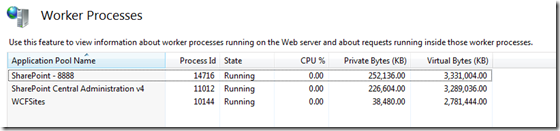
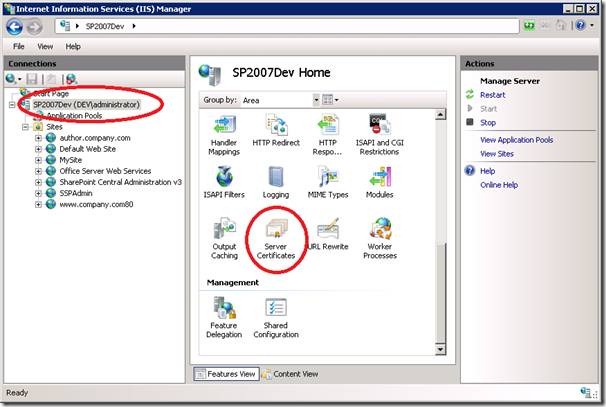
To get list of running worker process, Open IIS Manager ( Run > Inetmgr ), Select root level from left site navigation tree and from “Features View Panel” select “Worker Processes”
Click on the “Worker Processes” to get details of all worker process which are currently running as shown in below.
The Account SPFarm was getting locked with the App Pool with PID 5580. Updated the App Pool with different account and monitored for a couple of days. Everything is fine now.
Removing the SharePoint 2010 Service application can become quite a pain when the removal hasn’t work out the way it should have or when it is corrupted. In my case I am trying to remove the Corrupted Search Service Application. 1. I tried removing thru Central Admin. It took time and got timed out. No Luck. 2. Tried to remove using Powershell script, no luck. $spapp = Get-SPServiceApplication -Name "Search Service Application"
Remove-SPServiceApplication $spapp -RemoveData
3. Finally tried the STSADM command, Yeah...it worked!!!
STSADM.EXE -o deleteconfigurationobject -id "b90b7108-b808-4186-8d86-1ed1da72f3d0" NOTE: Please Open the Powershell with "Run as Administrator"
In SharePoint 2010 document libraries, the PDF’s that have been uploaded do not show the correct icon and only give you the option to save instead of opening them.
The below PowerShell script downloads a icon GIF image from Adobe named pdficon_small.gif, places it in the images folder under the 14 hive, associates it in the DOCICON.XML file, sets Browser File Handling to Permissive, and then runs IISReset.
PowerShell
$14 = "C:\Program Files\Common Files\Microsoft Shared\Web Server Extensions\14"
The PDF Key was added to the DocIcon.XML with this PDF GIF image icon file.
Browser File Handling to "Permissive" will enable the PDF’s to be opened instead of only saved.
PDF docs now have the correct icon and are allowed to be opened. Microsoft KB Article related to PDF Issue in SharePoint.
________________________________________________________________________
We can also enable opening PDF files is by adding the pdf extension to the allowed MIME types of the web application. VIEW
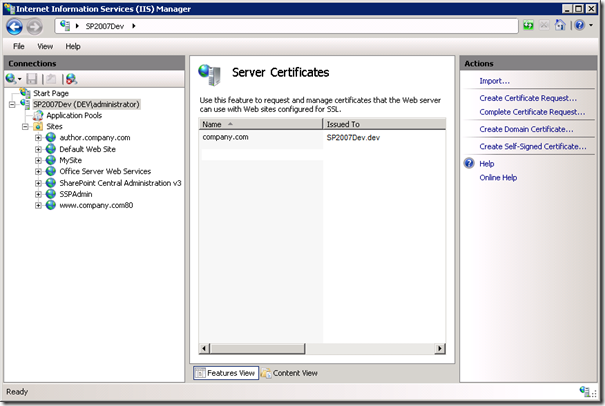
In SharePoint, IIS is the only place where the SSL Certificate needs to be uploaded and attached to the Site in the Site Bindings. 1. Click on the root node in IIS 7 Manager and select the “Server Certificates” icon in the feature pane on the right, you should Import your Cert here. 2. Enter a name (I’m using company.com in this example) and click OK. You should see your certificate appear in the list of server certificates. 3. Select the IIS site that is running the SharePoint application and click on the “Bindings…” link on the right hand side of the page. 4. To enable SSL click “Add”, select “https” and select the SSL certificate we created earlier: 5. Click OK. At this point we have configured IIS to allow connections to this site over SSL but we need to let SharePoint know to map these requests to the correct web application.
Configure SharePoint to accept requests over HTTPS
6. Navigate to Central Administration > Operations, select “Alternate Access Mappings” and click “Edit Public URL’s” 7. Select the Alternate Access Mapping Collection for the FBA web application and enter the relevant HTTPS address (e.g. My FBA site is located at http://www.company.com as an example so I would enter https://www.company.com). It is up to you which Zone you put the URL in as this doesn’t affect anything and is just there to help you remember what they are each used for.
Sometimes, even after the SSL Certificate is updated properly and the old Certificates are deleted, it will still be showing the OLD SSL Cert and may cause issues.
We should run the below Commands to make the NEW SSL Cert get updated.
1. Issue an iisreset /stop command
2. Then type net stop http followed by net start http
3. Issue an iisreset /start command
Even though you ran the above Commands sometimes, site will not be accessible. Verify the below option of the specific Web Site and make sure it is set to 'Ignore'. Don't forget to reset IIS, if the below option is modified.
First, go to Document/Form Library Go to Settings >> Document/Form Library Settings >> RSS Settings (under Communications) You can select the fields as shown below.
Update the List and View IDs and the URL should look as shown below. http://dev.sp2010.com/Infopath/_layouts/listfeed.aspx?List=E5F5F740%2DB5B8%2D440B%2DBA22%2D051127AAA366&View=211E24B2%2D01F9%2D44D1%2DB371%2DED8BD63249D9 You can give the link to users and they have an option to Subscribe to this feed.
stsadm.exe -o setproperty -url http://extranet.osi-systems.com -pn peoplepicker-searchadforests -pv "domain:ap.sp.com,AP\ups,Ff#bc5JD;domain:be.sp.com,BE\ups,SdF5a3m;domain:ip.sp.com,IP\ups,S&athn9w" NOTE: Don't use $ in you password for the UPS accounts. This is SharePoint bug and it fails to de-crypt the connection to AD and fails to retrieve the users based on your search in the People Picker. Retrieve People Picker Settings: $wa=Get-SPWebApplication http://extranet.osi-systems.com $wa.PeoplePickerSettings.SearchActiveDirectoryDomains $wa.PeoplePickerSettings
Services running on the Server: Get-SPServiceInstance
Requirements Hardware requirements for SharePoint Server 2016 won't be different from the preceding product, SharePoint Server 2013. On the software requirements side, organizations will need Windows Server 2012 R2 or Windows Server 2016 in place. They'll also need SQL Server 2014 Service Pack 1 or SQL Server 2016. Catrinescu recommended going with SQL Server 2016, if that's an option.
Upgrading from SharePoint Server 2013 to SharePoint Server 2016 is really fast, Catrinescu said. However, if an organization is using SharePoint Server 2010, then there's no direct upgrade path to SharePoint Server 2016. It will be necessary to upgrade to SharePoint Server 2013 first before making that hop.
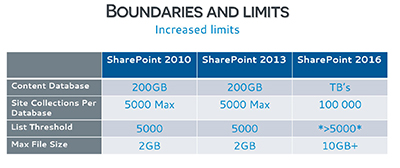
Some Limits Removed SharePoint Server 2016 is removing some limits seen with Microsoft's earlier releases. For instance, there was a list item limit of no more than 5,000 items for SharePoint Server 2010 and SharePoint Server 2013. SharePoint Server 2016 now permits more than 5,000 items in a list, with some caveats. Catrinescu said that the maximum he has seen is 120,000 items in the same list view and he said it works, but it's not fast. The problem isn't with SharePoint, he explained, but with SQL Server, which can lock if you query a list with over 5,000 rows in a table.
Microsoft also increased file sizes used with SharePoint Server 2016. The maximum file size previously was 2GB, but now it's 10GB or greater (which is the recommended limit). Catrinescu said he's tried a file that's 15GB in size and it works. While the file size expansion is a good thing, Catrinescu cautioned IT pros that they should still keep an eye on the growth of their content database sizes.
Site collections per database got a boost with SharePoint Server 2016. The old limit was 5,000 site collections. The new server expands that limit to 100,000 site collections. This slide summarized the increased limits in SharePoint Server 2016:
[Click on image for larger view.]Figure 1. Limits changes with SharePoint 2016. Source: Jan. 21 Crow Canyon Systems Webinar.
Topology Changes SharePoint Server 2016 will bring a new MinRole topology option, which reflects Microsoft's best-practice approach for server farms. Catrinescu said that earlier SharePoint Server products, such as SharePoint Server 2010, had "traditional topologies" with two server roles, a front-end server and an application server. With this design, there was useless network communication happening to access various services in response to user requests, which generally slowed things down, he explained.
Microsoft came out with "streamlined topologies" with SharePoint Server 2013, consisting of four server roles: a front-end server, a distributed cache server, a batch processing server and a server for specialized workloads. The benefit of this approach is that user requests for services were accessed from the front-end server, so results came back to users faster. This approach stopped wasting inter-server communications time and was a lot better, but it wasn't 100 percent optimized, he said. The streamlined topologies approach wasn't hard coded in the product, but was just based on Microsoft's guidance.
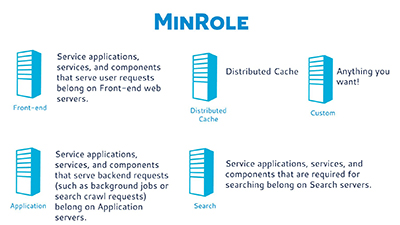
The new MinRole topology requires the use of at least four server roles to make a farm: front-end, distributed cache, application and search. IT pros specify the server role when adding a server to a server farm. User requests come from the front-end server. Distributed caching happens on the distributed cache server. Scheduled tasks come from the application server. The custom server role runs anything you want. SharePoint Server 2016's MinRole approach is shown in this slide:
Figure 2. MinRole in SharePoint Server 2016. Source: Jan. 21 Crow Canyon Systems Webinar.
It's possible to have a single server topology with SharePoint Server 2016, but it doesn't include SQL Express anymore, so organizations have to install SQL Server separately if going this route. However, it's not possible to have a custom server and a single server in the same SharePoint farm, Catrinescu said. If an organization doesn't have four servers to spare, they can go with the custom server option.
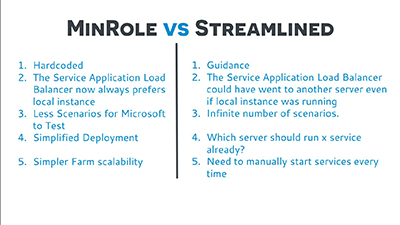
Microsoft essentially hardcoded the streamlined topology approach with MinRole. "MinRole is actually [SharePoint Server] 2013 guidance from the streamlined topology, but in code," Catrinescu said. In general, MinRole, derived from Microsoft's cloud approach, requires less testing and promises more simplified deployments than the older approach. Catrinescu showed the following slide, which contrasts the MinRole approach in SharePoint Server 2016 with the streamlined topologies approach in SharePoint Server 2013:
Figure 3. MinRole vs. streamlined topologies comparison. Source: Jan. 21 Crow Canyon Systems Webinar.
Highly available topologies with SharePoint Server 2016 using the MinRole approach, and including a custom server plus Office Online Server (formerly known as "Office Web Apps Server"), will require having 14 servers in place, Catrinescu said. It's still possible to have high availability with just two servers, but you'd have to go the custom role route, he explained.
Later during the talk, Catrinescu said that Office Online Server is something that IT pros maintaining SharePoint farms likely will have to install since so many SharePoint features will depend on it. Office Online Server is currently at the preview stage, and Microsoft hasn't indicated a product availability milestone for it yet.
New Features Catrinescu blitzed through some of SharePoint Server 2016's new features. Hybrid support is a big theme with SharePoint Server 2016. Catrinescu said that using the SharePoint hybrid configuration wizard is really easy now.
There's support for hybrid Team Sites. Microsoft added a profile redirection capability that shows information in Delve, which is Microsoft's Office 365 solution that surfaces organizational and contact information. Documents tracked by Delve will show up in a SharePoint intranet sites. Hybrid search will show the best results in a single page.
The zero downtime patching claim for SharePoint Server 2016 is "not a myth," Catrinescu said. It works, but organizations will need to use the MinRole topology with high availability to have that capability. He explained that to patch SharePoint Server, there are two required steps. The update needs to be installed first and then the PSConfig program needs to be run. With SharePoint Server 2016, the schema update process doesn't cause server downtime, but MinRole with high availability will be needed to get that benefit.
Another new feature is the ability to create durable links, where URL links don't break when files get moved. That's an issue today with SharePoint Server 2010. However, Catrinescu noted that to use the durable links feature with SharePoint Server 2016, organizations likely will need to install Office Online Server. The Office Online Server also brings benefits for business intelligence and search capabilities, he added.
Microsoft has enabled a Fast Site Collection Creation feature for SharePoint Server 2016. It copies a template at the database level to speed up the site collection process.
Microsoft has integrated Project Server, which now functions as a service application in SharePoint Server 2016. This feature eliminates having to oversee two separate patching activities.
SharePoint Server 2016 also is bringing the ability to use SMTP ports other than the default one (Port 25). Other ports now can be used to send e-mails.
Data loss prevention (DLP) also arrives with SharePoint Server 2016. It's used to find sensitive info before it gets leaked in e-mails. It'll flag things like credit card numbers, Social Security numbers and bank account numbers, protecting against disclosure, and also advising the end user about the issue. It works with Microsoft's E-Discovery Center, which has a query capability to find sensitive documents.
Deprecated Solutions Microsoft plans to deprecate some of its software used with SharePoint Server 2016. The deprecated software won't get further development by Microsoft. Catrinescu has actively tracked those deprecation changes in his blog.
He said that SharePoint Foundation goes away with SharePoint Server 2016. Excel Services is gone, too, but if an organization has Office Online Server in place, they'll still have some of those Excel Services capabilities.
Forefront Identity Manager 2010 R2 is replaced by Microsoft Identity Manager 2016. Catrinescu commented that Microsoft Identity Manager 2016 wasn't built in SharePoint Server. It's a fully separate product now. He explained that the old Forefront Identity Manager 2010 code just didn't mesh with Microsoft's best practices for the new SharePoint Server. Moreover, Forefront Identity Manager 2010 didn't work with Windows Server 2016. Microsoft Identity Manager 2016 is a more "modernized platform" that has the capability for hybrid Active Directory deployments. On SharePoint Server 2016 farms, using Microsoft Identity Manager 2016 can require using an extra server and is "a lot harder to set up." However, it also can be installed on SharePoint's application server, which is a Microsoft supported approach and it's what most organizations will do, Catrinescu said.
SharePoint Designer 2013 and InfoPath 2013 are subject to deprecation by Microsoft but they will still work with SharePoint Server 2016. Microsoft announced extended product support for those solutions this week when it rolled out the release candidate of SharePoint Server 2016.
Catrinescu claimed that Microsoft introduced no new features with the release candidate of SharePoint Server 2016 compared with the earlier beta 2 release. Microsoft is just fixing about 250 bug fixes, he said.